Next-generation security

Sensitive files from your client. Only you can open them.

  • No passwords to share over SMS or a second email
  • Our server never sees the contents of the file
  • Your client needs no account and no install
  • Future-proof encryption
  • Hosted in the EU
  • We don't track users
How it works

Three steps from send to open

Your client deals with no account and no install — just a link and a browser. You open the file as if it came from your own drive.

Sender

Your client

  • Opens your link
  • Picks a file
  • Everything happens in the browser
Protective envelope
encrypted package

Server

GrataQ

  • Relays the encrypted package
  • Never sees the file's contents
  • Can't open it
No access to the contents
encrypted package

Recipient

You

  • Downloads the file
  • Opens it in your app
  • The key stays with you
Opened only by you

And how it works in practice

Three steps you'll see in the app every day.

  1. You create a link for your client

    In the app you name the link (e.g. "Contract ABC"), set how long it stays active, and optionally ask for the sender's name. You send the link to your client by email or text — it isn't a secret password; the key that unlocks the file stays with you and you alone.

    The link works like a one-time gate — once the upload is done, or once its window closes, it shuts on its own. You can also revoke it manually at any time.

    send.grataq.com/u/h7k2-q4mp
  2. Your client uploads the file

    They open the link in their browser and immediately see they're sending to you — your logo, your name, and your verified domain. They pick a file and send it, and the security happens automatically.

    Your client needs no account and no install. It works the same on a phone or a computer.

    As simple for your client as WeTransfer
  3. You open the file on your side

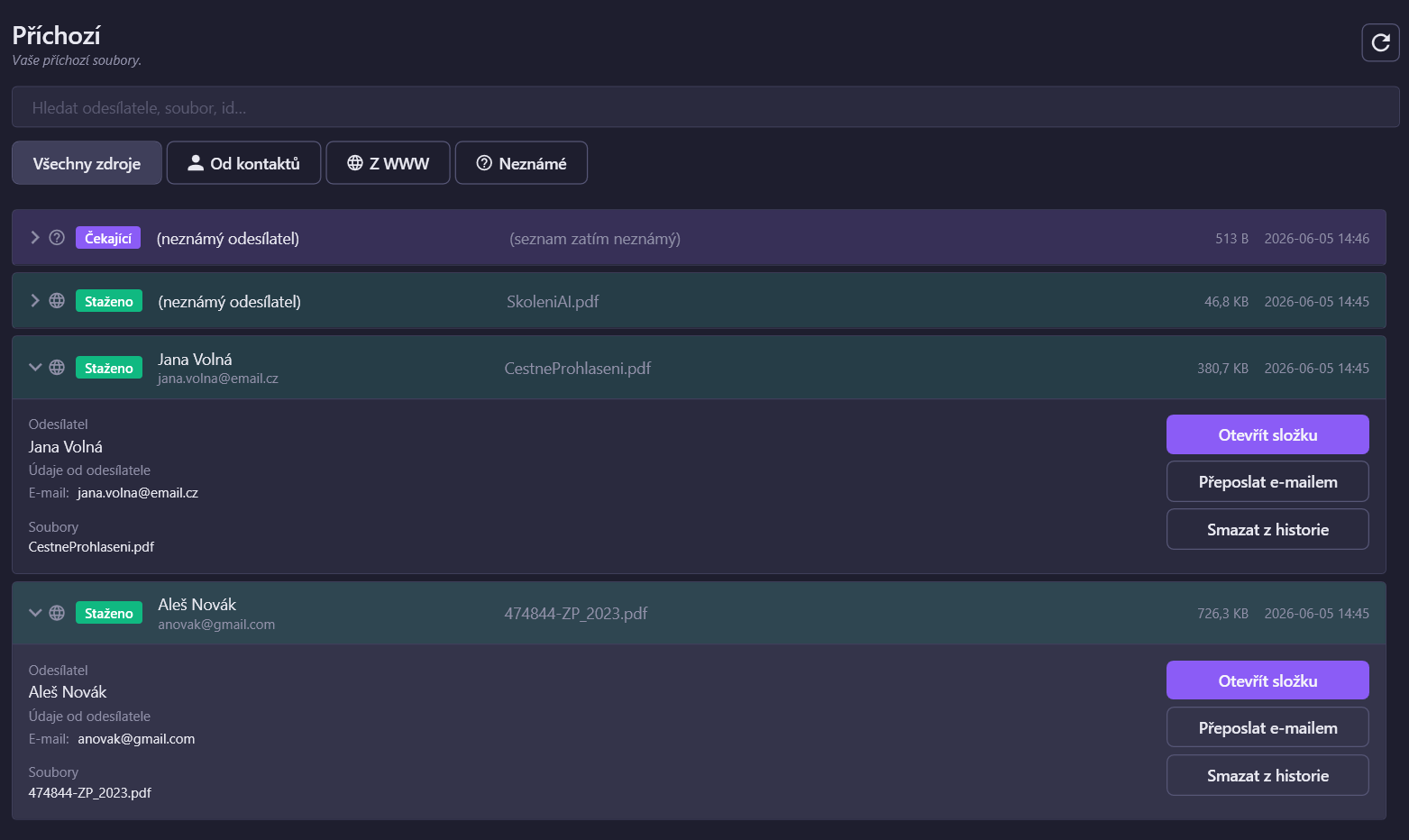
    A new item appears in your Inbox in the app. You click, and the file is right there — as if it came from your own drive. Our server never saw its contents.

    It all happens automatically. No passwords to manage, nothing to retype — you just open the file.

    As simple as opening an attachment
What GrataQ does differently

A different league from an upload link

Plain email and upload services (Filemail, WeTransfer, Dropbox Transfer, MASV, TransferNow) don't solve the hardest part: how to hand your client the key safely. Here's a head-to-head comparison.

GrataQRecommended Filemail WeTransfer Dropbox Transfer MASV TransferNow Email
Post-quantum cryptography Yes No No No No No No
Full encryption (E2E) Yes Business only No No No Only with a password No
Service hands over the key Yes You hand it over You hand it over You hand it over You hand it over You hand it over You hand it over
Server sees the contents No Only without E2E Yes Yes Yes Only without a password Yes
Verified identity Domain (DNS) No Email only No No No Easily forged
Data in the EU Yes Business only By IP Defaults to the US Via the store Yes (FR) Depends on provider
an advantage for you only with a condition (plan / password) a weakness

Comparison based on each service's publicly available documentation as of June 2, 2026. Details may vary by plan and over time — always confirm with the provider for binding information.

Who it's for and why

Where sensitive data leaks today

A client emails an attachment, drops a large file on a transfer service, snaps a photo of a record into a messenger app. It ends up on someone else's servers, often outside the EU, with no encryption and no record of who could access the file. See if this sounds familiar in your field.

Healthcare and psychology services

Medical reports, scans, assessments

A patient is sending me a photo of a prescription over Messenger. This can't be right.

Sensitive data in the special-category regime of the GDPR (Art. 9). Encrypted right at the sender, hosted in the EU. We know exactly where the data is and who handles it.

Architects, designers, and construction

Large drawings and project documentation

The drawings are too big for email, so we put them on a transfer service. Then they sit on someone else's server and we don't know who can access them.

Large attachments through your link with a raised limit — encrypted right at your client, not on someone else's drive. Our server sees only unreadable data, not your design.

Attorneys, notaries, accountants, tax and financial advisors

Contracts, mandates, tax and financial records

Client documents come in by email. I don't have the budget for my own secure portal, but I have to protect them.

Files encrypted right at your client; our server never sees the contents. After download they're automatically deleted from storage — and there's nothing for you to build or run.

Public administration, government offices, and schools

Official filings and citizens' records

Citizens and parents upload records into a web form. They have no idea whether it goes to us or to someone impersonating us.

An office's or school's domain verified through DNS — the sender sees they're sending to you, not to an imitation. No account, no install on their end.

Insurers and claims adjusters

Claim reports, photos, medical and police records

Clients photograph the damage and send it over WhatsApp. It gets mixed in with personal chats and I can't file it properly anywhere.

Incoming transfers in a single inbox with history and a notification on every new file. Search by sender and by name — nothing gets lost.

Staffing agencies and real estate offices

Copies of records, contracts, statements

Candidates and clients dump copies of records and statements on us through WeTransfer and Dropbox. Then it all sits on someone else's server.

An intake link with a short expiry — once it lapses, it closes on its own. Records encrypted at your client; the key stays with you alone.


A look inside the app

What GrataQ does for you

Intake links with a clear life cycle and a verified institutional identity — two things that keep your transfers under control.

A link that closes itself

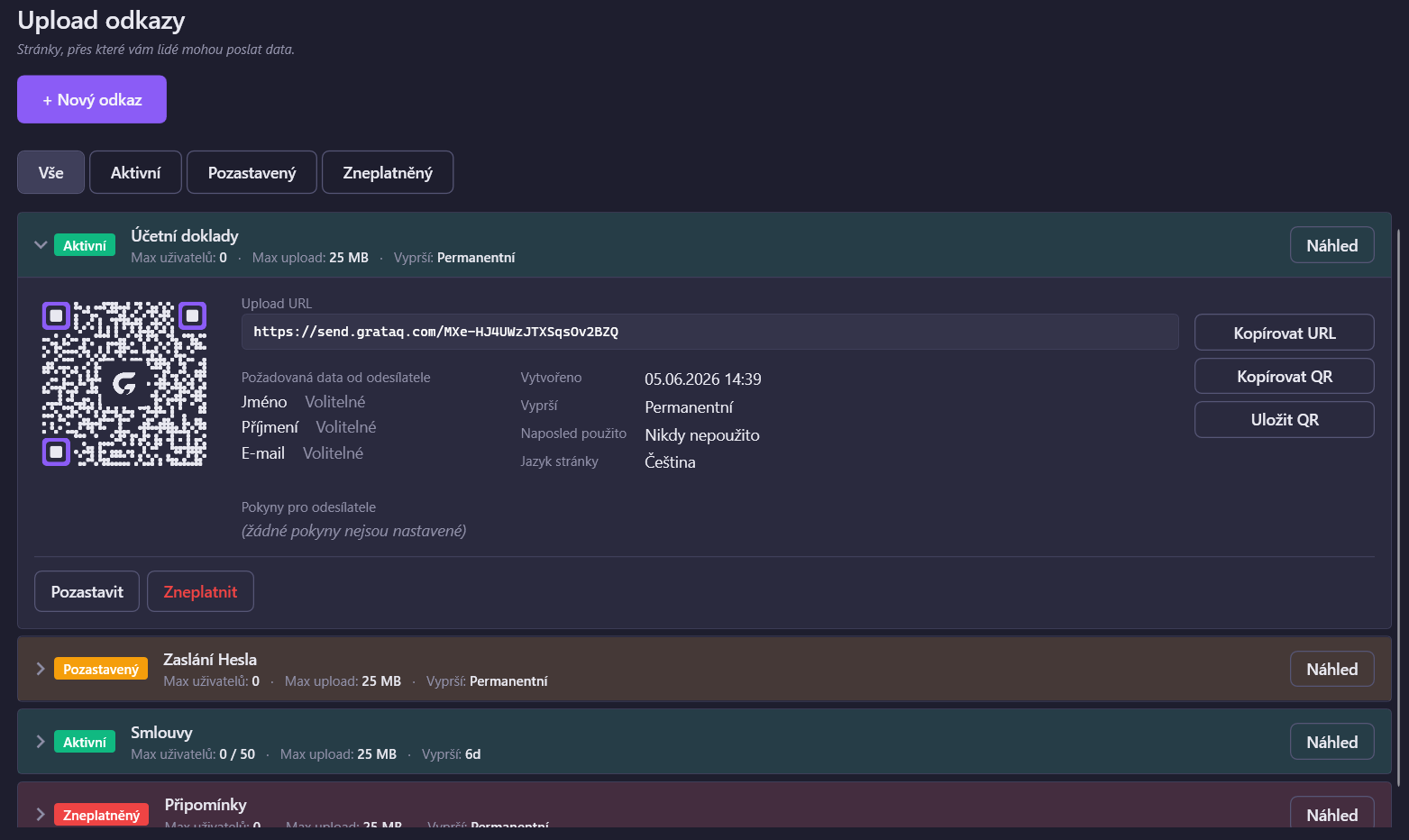
Every link has a limited lifespan. Active → closes once complete, or expires automatically once its window passes. In the app you have an overview of every link and its status.

The GrataQ app window showing the list of intake links and their statuses
Overview of intake links — active, expired, revoked

Your client sees they're sending to you

You verify your domain once — then on the upload page your client sees your logo, your company name, and a green "Verified domain" badge. They can be sure they're sending to you, not to an imitation.

The browser upload page showing the institution's logo, name, and a Verified domain badge
What the sender sees — your logo, your name, and your verified domain

Private by default: we don't track users — no analytics, no third-party cookies, no profiling. Not in the app, and not on the website.

Start receiving files securely

The Windows app is in the Microsoft Store. Install it in a minute, verify your domain, and you can send your clients their first link.